Strength logger for iPhone and Apple Watch
Log the set in one tap.
Weight, reps and reps in reserve wait in a dock under your thumb. Swipe to adjust, tap to log, get back to the bar. On your iPhone, or on an Apple Watch that works on its own.

Scan to open the App Store on your iPhone
Free download. Logging needs a trial or purchase; history and export always stay available.

-
No OrthoRep account
Nothing to create, nothing to sign in to.
-
Logs with no signal
Workouts are stored on your iPhone and Watch.
-
Standalone Watch app
Logs sets with the iPhone out of range.
-
Export any time
Back up to a file and restore from it. Always available.
A set, logged.
The logging screen, with the numbers the app would show. Try it: tap Log set.
It remembers last time.
The dock opens on your last weight and reps for this exercise, so a straight repeat is one tap.
Swipe to adjust.
Drag a chip to change weight, reps or RiR. Tap it to type, with a plate calculator on the weight keypad.
Tap Log set.
The row turns logged, the next set becomes current, and the optional rest countdown starts in the button.
Up next is already there.
When the sets are done, the next exercise is one tap away. Session volume and heart rate from a connected monitor stay at the top.
- Set 1CurrentPlanned225 lb × 8225 lb · 6–8 repsRiR 2
- Set 2CurrentPlanned225 lb × 8225 lb · 6–8 repsRiR 2
- Set 3CurrentPlanned225 lb × 8225 lb · 6–8 repsRiR 2
- Set 4CurrentPlanned225 lb × 8225 lb · 6–8 repsRiR 2
Interactive demo needs JavaScript
-
Tap or swipe to log.
Weight, reps and reps in reserve sit right above Log set. Tap for a keypad, swipe to nudge, plate math when you need it.
-
Weekly movement coverage.
See whether this week hit push, pull, squat and hinge, and what is still open.
-
History that sets up next time.
Last time’s numbers on every exercise, PRs, and progression suggestions you accept or decline.
The Watch logs on its own.
Start a routine from your wrist. Tap a set to log it. The iPhone can stay in the bag, out of range, or at home; the workout transfers to it once, with no duplicates.
-
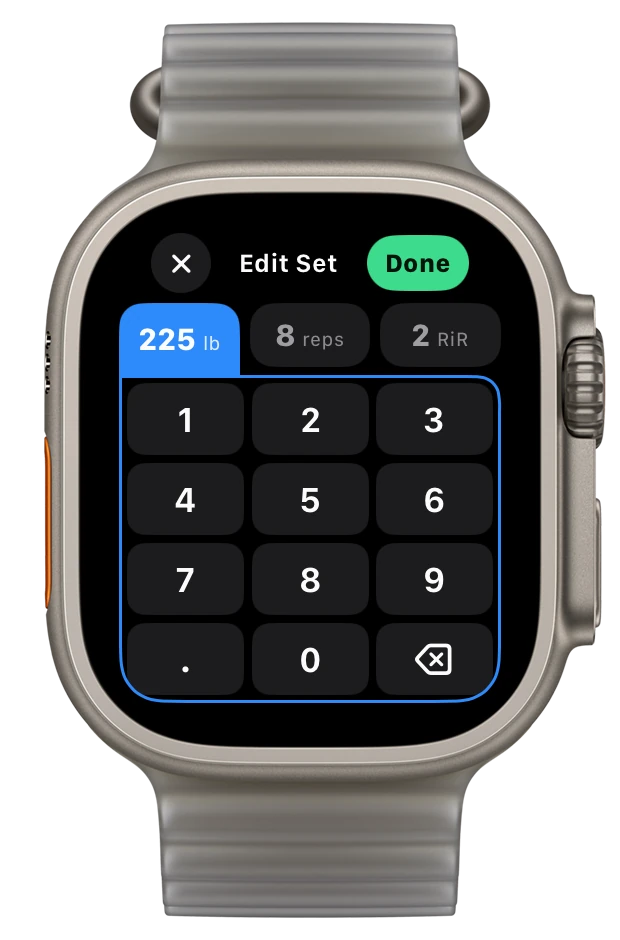
Tap to log, turn to adjust.
Edit weight, reps and RiR with the keypad, the minus and plus buttons (hold to accelerate) or the Digital Crown. Apply a change to the remaining sets in one go.
-
Rest runs by itself.
A passive countdown starts when you log. Skip a set, unskip it, add an exercise, finish or discard.
-
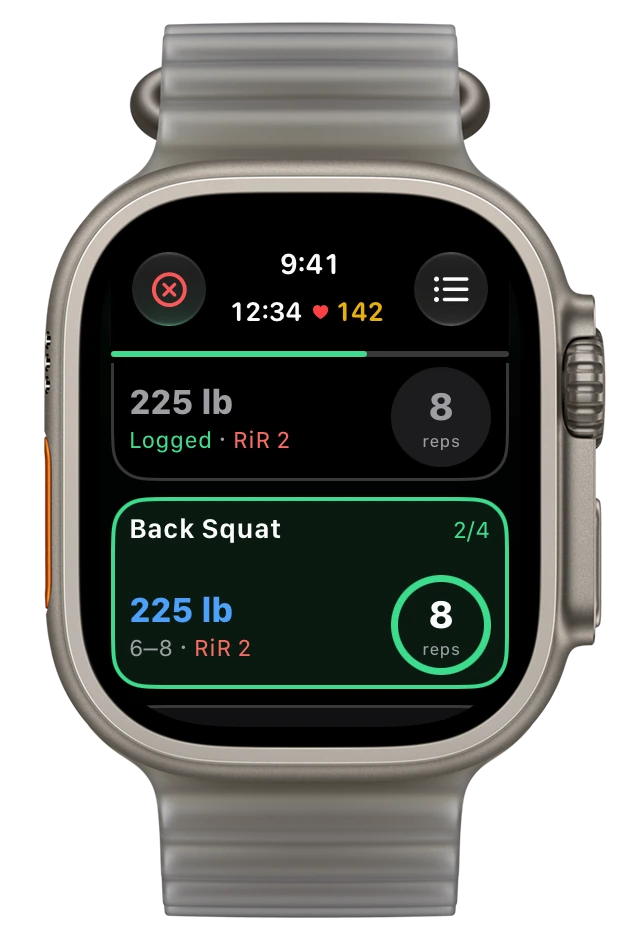
Warm-ups and heart rate included.
Warm-up sets are marked. Heart rate comes from the Watch workout session. Stats and Now Playing pages are a swipe away.
It does the arithmetic.
The numbers a lifter would otherwise do in their head, done by the app, shown as plain facts you can accept or decline.
Progression, as a card.
After 4 workouts, when an exercise has had good signal 2 sessions in a row, a suggestion appears inline. Accept or decline. Bodyweight moves suggest more reps.
Deload, one option.
Half the sets at 90% of the weight for one week. Also accept or decline.
Warm-ups, automatic.
Warm-up sets are generated for the working weight. Edit or skip them.
PRs and estimated 1RM.
Rep-max records are detected as you log. Each exercise shows best weight, best set volume and an estimated one-rep max.
Plate calculator in the keypad.
Type a weight and see the plates per side. kg or lb.
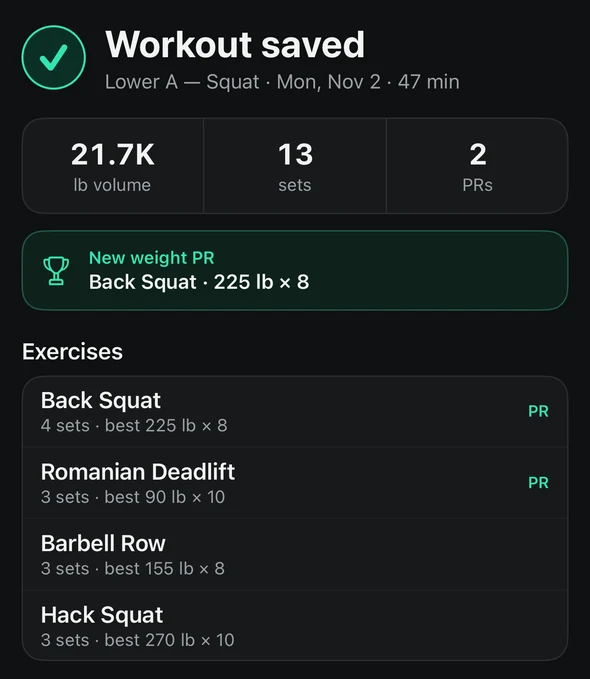
A finish sheet with the sums.
Sets logged, volume and PRs before you save, then a summary with each exercise’s best set and any new record.
Eight weeks on one screen.
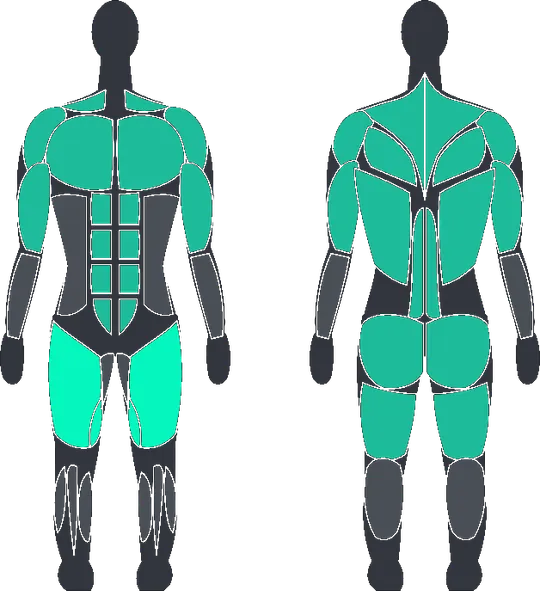
Progress shows weekly volume, per-exercise stats, PRs and a body map of this week’s sets. The Dashboard shows today’s workout, what is up next, and weekly coverage of push, pull, squat and hinge.
- 8-week volume chart and a share card for a PR
- Muscles body map: a heat map of this week’s sets
- One recommended starter from your equipment and training days, then 8 routines and 27 templates, with routines you can adapt to your equipment, on a one-screen weekly schedule
- Searchable exercise library with equipment, body-part and movement filters, custom exercises and animated form guides for the main lifts


Nothing to sign in to.
There is no OrthoRep account. Your workouts are stored on your iPhone and Apple Watch, and you can export them to a file at any time, access or not.
- Stored on iPhone and Watch
- Apple Health only if you turn it on
- Export your history any time
- History stays viewable, always
- Anonymous usage counts only: no ads, no crash reporting, no third-party login
This website sets no cookies and loads nothing from anyone else.
One plan, three ways to pay.
Every feature is in every plan. Pick how you want to pay. Purchases are made in the app.
-
Annual
Recommended$20per year
14-day free trial for eligible new customers.
Then $20 per year. Renews until canceled; cancel at least 24 hours before the trial ends to avoid a charge.
-
Lifetime
$64.99once
Pay once. No trial.
One-time purchase, charged when you buy. No subscription, no renewals.
-
Monthly
$3.99per month
No free trial.
Charged when you subscribe, then renews monthly until canceled.
Prices in US dollars; the App Store shows local prices. The app is free to download. Logging new workouts needs a trial or purchase; history and export stay available without one. Restore Purchases is in Profile. Plans are bought in the app through your Apple ID. Nothing is sold on this website.
Questions.
How does the free trial work?
The 14-day trial is on the Annual plan and is for eligible new customers, as determined by the App Store. After 14 days the annual price is charged unless you cancel in your Apple ID subscriptions before then. Lifetime and Monthly have no trial.
Do I need an account?
No. There is no OrthoRep account and no sign-in. Purchases go through your Apple ID like any App Store purchase.
Where are my workouts stored?
On your iPhone and your Apple Watch. Apple Health is optional. You can export everything to a file from Profile and restore from that file on a new phone. The details are in the Privacy Policy and the Consumer Health Data Privacy Policy.
Does the Watch need the iPhone nearby?
No. The Watch app starts a routine or template, logs sets, runs rest and records heart rate on its own. When the iPhone is back in range the workout transfers once, with no duplicates.
What happens if I stop paying?
You keep the app, your history and export. Logging new workouts needs a trial or an active purchase.
Can I import from Strong or Hevy?
Yes. Export a CSV from Strong or Hevy. In OrthoRep open Profile, go to Export and tap Import from Strong or Hevy. Finished workouts, exercises and sets are added; routines are not.
Which devices does it run on?
iPhone with iOS 18.6 or later, and Apple Watch; the Watch app installs with the iPhone app and it needs watchOS 10.6 or later. There is no Android or web version.
Does it do cardio or build programs for me?
No. OrthoRep is a strength logger with routines, templates and progression suggestions you accept or decline. It does not generate programs, run HIIT or cardio, or chat.
Is there an age requirement?
Yes, 13 or older, and under 18 with a parent's or guardian's permission. See the Terms and the Health & Fitness Disclaimer.
How do I get help or a refund?
Email support@orthorep.app. App Store purchases are refunded by Apple; we can point you to the right place.

Your next set is one tap away.
Free to download. 14-day trial on Annual for eligible new customers.
Scan with your iPhone